Mobile electrical CAD and simulation for engineers on Android
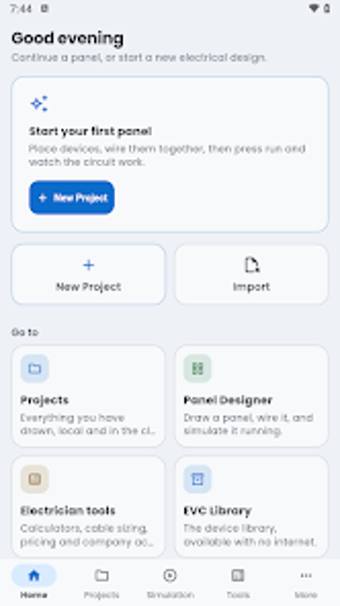
Design control panels and run interactive circuit simulations on an Android device: full wiring diagrams, PLC logic blocks, and Arduino Uno emulation in one mobile workspace. Wireona targets electrical engineers, automation technicians, and students who need on-device drafting, live instruments, and step-by-step tutorials. The developer supplies a mobile-first CAD and simulation workspace, and the app combines component libraries, a real-time oscilloscope, and project tracking to support both field work and classroom practice.
What professional tasks the tool covers
The app maps design through test to documentation. It supports panel layout and wiring diagram creation with an industrial component library, then runs real-time simulation with live instruments such as an oscilloscope. It can emulate an Arduino Uno (including PWM, motors, and sensors) and edit PLC logic for Siemens LOGO! and Schneider Zelio, so a single project can move from schematic capture to functional verification on the same device.
How the core workflow shapes engineering output
Workflows group design, simulation, and project records. Users place components from a library of over 400 devices, wire them in a mobile CAD view, then invoke the simulation engine to observe signals and instrument readouts. The tool also includes project management to record work hours, wages entries, and expenses, letting a technician keep design files and basic job tracking together.
What the interface and learning curve require
Academy content and guided examples reduce onboarding friction. The app bundles educational materials and tutorials labelled Wireona Academy, which support students and technicians learning PLC function blocks, ladder logic, and Arduino programming. Basic design and simulation work runs offline, while the Academy and cloud sync need an internet connection, so initial learning can proceed on-device before connecting for extra resources.
How it fits team workflows and file compatibility
Simulation and format choices support handoff and testing. The tool targets industrial electrical workflows by including Siemens LOGO! and Schneider Zelio logic editors and Arduino emulation, which helps verify automation logic before commissioning. The app runs on Android and also on Windows systems, giving cross-platform access for field engineers and desktop reviewers who need to open and test the same project files.
Who should adopt the tool and when
Wireona suits electrical engineers, industrial electricians, and students who need an on-device environment that combines schematic drafting, PLC and Arduino simulation, and job tracking. Expect a professional-grade mobile workflow that supports verification of control logic and instrument-level testing; less suitable for users who only need a basic diagram editor without embedded simulation or training materials.